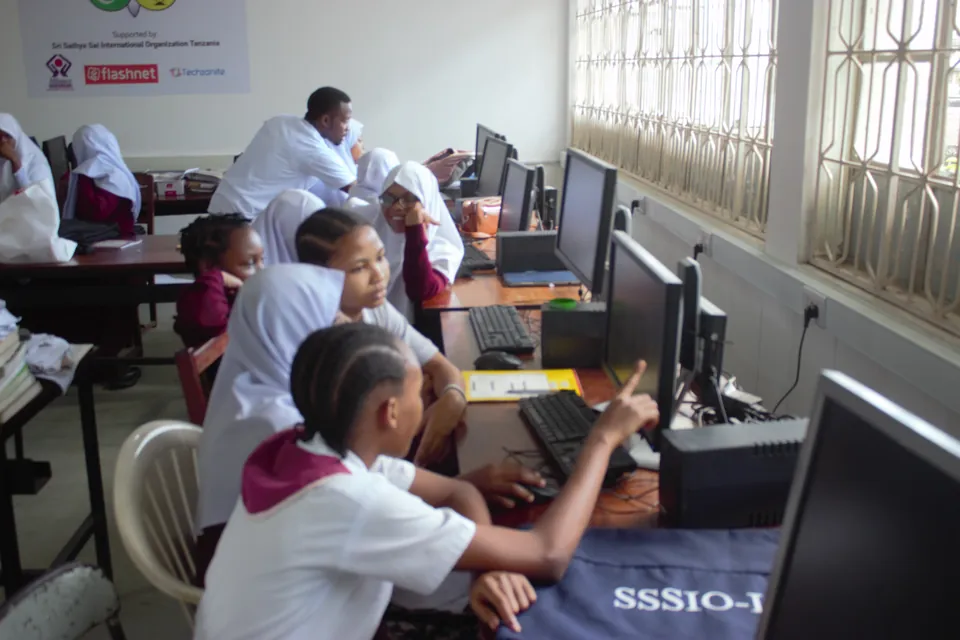
On 29 July 2023, Pellagia Njau photographed a Kiwix training session at Kisutu Girls High School. The picture records something so basic that it tends to disappear from conversations about digital infrastructure: someone first has to learn where the information is and how to get to it.
The internet has made it routine to look up one question and follow ten more. Preparing an offline library brings the hidden decisions into view. Which questions do we expect readers to ask? In what language? Who reviews the collection when a manual changes or when nobody can find the cable that powers the library?
A library in a file
Kiwix reads ZIM files. The format bundles and compresses material prepared for offline access. The Kiwix library offers collections and editions of different sizes. Choosing in advance helps distinguish a set that fits on one phone from a collection meant to serve many readers.
The library can live on the reader’s device or on a machine that serves it over local Wi-Fi. A phone still needs to join that network, even if the network has no internet access. Before moving a large collection, check the available space, the largest file the transfer medium can hold, the file format and the rights for each collection.
From looking things up to following a lesson
Kolibri, from Learning Equality, organises resources into channels. A local installation can import material from another installation on the network or from external storage after someone has obtained and prepared it. A lesson can have its own sequence, worksheets and activity records. The available resources depend on the installed channel and its terms of use.
A good collection reflects what the school uses it for. A reference library becomes more valuable when a word is easy to look up. A lesson also requires people to find the right resources in the right order. Language, legibility, keyboard access, captions and maintenance costs matter in both cases.
| Format | Use | What must be available |
|---|---|---|
| Local HTML file | Read one complete feature | Saved file and an application that opens HTML |
| Kiwix and ZIM | Search and read collections | ZIM file and a reader or local server |
| Kolibri | Follow lessons and exercises | Installation, imported channel and local network if shared |
The test begins with the internet off
Choose a text in the readers’ language, save a copy and record the date. Turn off mobile data and internet access. If the school serves the content itself, keep only the local network active. Find and open the text, follow a chapter, and check that its pictures still appear. Close the application and reopen it.
The standalone copy of this feature contains its text, photograph and table. It stays wherever the reader saves it, and its external references open when a connection is available. On systems that restrict the opening of local HTML files, printing to PDF is an alternative. A browser can evict cached data. A saved file gives the reader a copy they can locate and move while the storage remains available.
Sources in this section 5
The value of the next update
An older copy can still help if it says when it was made. A school team can begin with two or three collections, test them on another device, store a backup on a second drive and decide when to review them. A local-language catalogue that everyone can open may be more useful than a much larger collection without curation.
The Kisutu photograph documents a training session. The sources explain how to distribute the resources. Understanding the impact at a particular school would require measuring what people can find, on which devices and how often.
Sources and references
- Kiwix · Hotspots and sharing over a local network
- Kiwix · Content, readers and the ZIM format
- Learning Equality · About the Kolibri platform
- Learning Equality · Managing and importing channels and resources
- MDN · Browser storage quotas and eviction
- Pellagia Njau · Photographic record of the Kiwix training
Sources reviewed on .